
-
-
E-mail


The visual deep learning training software is a specialized tool designed for multiple scenarios such as industrial vision and scientific research experiments. It focuses on rapidly constructing, training, and optimizing visual deep learning models. Without requiring complex programming skills, it enables efficient operations throughout the entire process from data preparation to model deployment. Balancing professionalism and ease of use, it assists users in quickly implementing applications related to visual recognition, defect detection, and more.
The software, with deep learning algorithms at its core, is compatible with mainstream visual training frameworks such as PyTorch and TensorFlow. It integrates one-stop functions including data management, model training, parameter configuration, accuracy evaluation, and model export. It is suitable for various visual tasks such as object detection, image classification, and defect recognition. It is widely used in fields like industrial quality inspection, parts sorting, and image analysis, especially for model training needs in industrial scenarios like piston appearance sorting.
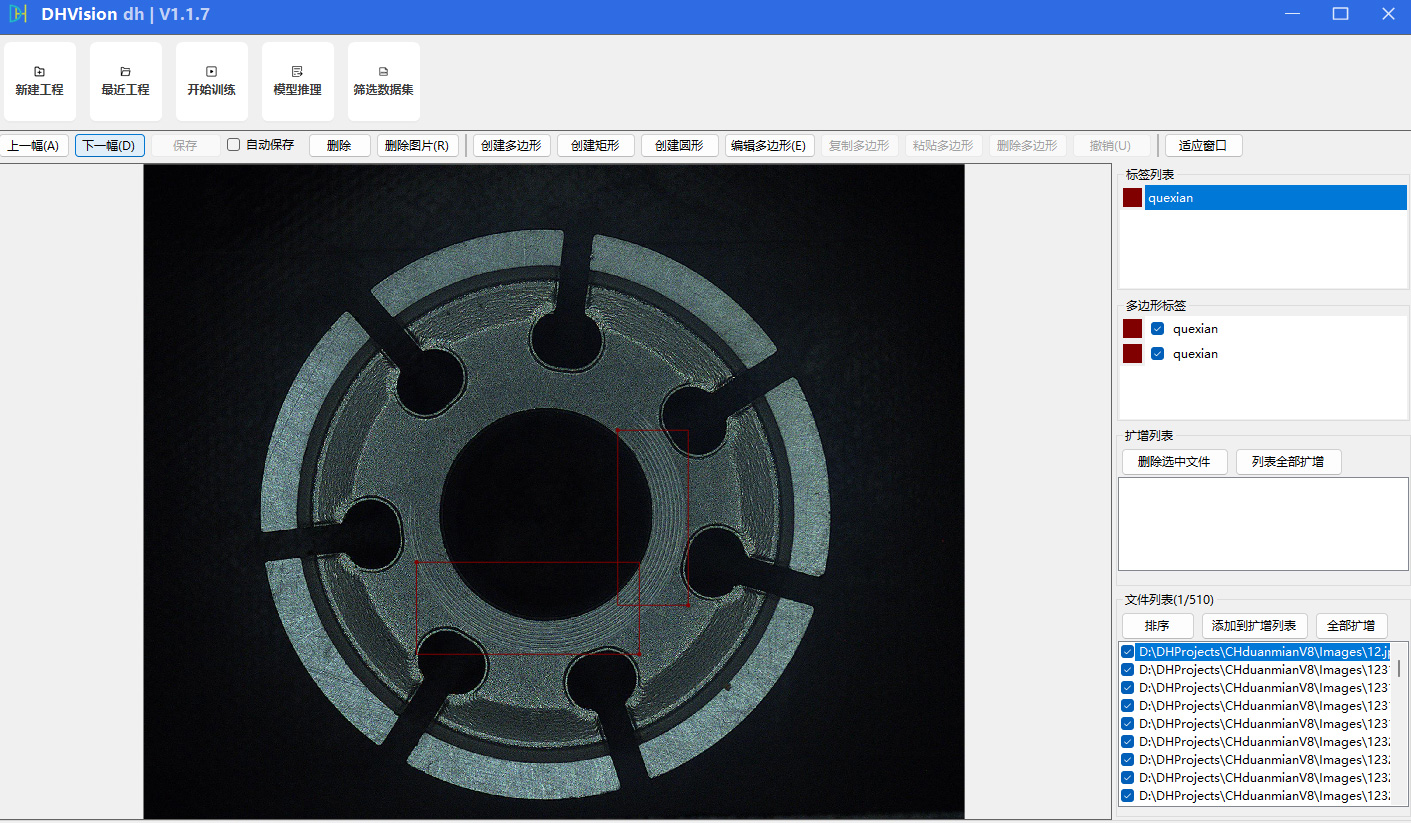
Key functional highlights
1. Convenient data management and adaptation
It supports the import of image data and annotation files in multiple formats, allowing direct loading of annotated datasets without requiring additional format conversion. It features data merging and annotation verification functions, facilitating users to append new data for incremental training, ensuring that the new data is aligned with the original dataset format and has consistent categories, effectively reducing data preparation costs and enhancing model iteration efficiency. Additionally, it supports offline data processing, eliminating the need to upload to the cloud, effectively protecting enterprise production privacy and core data security.
2. Flexible visual parameter configuration
It provides a concise and intuitive operation interface, where core training parameters can be directly configured visually through the interface, including network type, training batch size, training epochs, image size, working threads, training method, training weights, etc., without the need to manually write configuration files. It supports switching between "new model training" and "incremental training" modes, allowing flexible loading of pre-trained weights or existing training models to adapt to different training requirements. Parameter adjustments take effect in real-time, reducing the operational threshold for users.
3. Efficient and stable model training
Equipped with an optimized deep learning training engine, it supports CPU/GPU acceleration and can automatically adapt to the optimal training strategy based on hardware configuration, thereby enhancing training speed. During the training process, it displays real-time training progress, remaining time, Loss curve, and mAP core accuracy metrics, allowing users to monitor the training status in real time and adjust parameters promptly. It supports automatic model saving during training, with the ability to set the number of saving rounds, preventing data loss due to training interruptions. Additionally, it features an Early Stopping function, which can proactively terminate training to preserve the optimal model.
4. Comprehensive model evaluation and optimization
After training is completed, a model evaluation report is automatically generated, clearly displaying core accuracy metrics such as mAP50 and mAP50-95. It supports visualizing inference results, allowing for quick identification of overdetection and missed detection issues, and assisting users in optimizing their models. The system also supports model fine-tuning, enabling users to adjust parameters and continue training for scenarios where accuracy is insufficient. Additionally, an interactive tool for adjusting post-processing parameters of the model is provided, helping users quickly determine the direction for optimization.
5. Flexible model export and deployment adaptation
Supports the export of models in multiple formats, allowing for the setting of export sizes based on deployment requirements, and adapting to different deployment scenarios such as industrial equipment and servers. For CPU inference optimization, provides a variety of CPU configuration files, enabling the generation of lightweight models that balance inference speed and accuracy. This ensures that the trained models can be quickly implemented in practical applications, achieving high coordination between the edge and cloud, and adapting to various scenarios including offline deployment without network and cloud deployment.

Software Advantages
Compared to traditional visual training tools, this software requires no professional programming skills, has a low learning curve, and balances ease of use with professionalism; it offers flexible parameter configuration, adapting to visual training tasks of different scales and types; it boasts high training efficiency, supports multi-threaded data loading and hardware acceleration, significantly shortening the training cycle; it has strong compatibility, supports mainstream dataset formats and training frameworks, and can seamlessly integrate with existing production line data and equipment. Additionally, it features intelligent annotation capabilities, enhancing annotation efficiency and reducing data preparation costs.
Applicable scenarios
It is widely used in industrial visual inspection (such as component defect detection, appearance sorting), intelligent image recognition, scientific research experiments, automated production line upgrades, and other fields. Whether it's for novice users to quickly get started with visual deep learning training or for professional users to efficiently complete model iteration and optimization, it can meet the needs of use, especially for high-precision quality inspection model training in industries such as automotive components and consumer electronics.
Actual shooting of software operation


Leave a message